
A feature of the VaultSCAPE module is Advocate, which allows you to collect and manage customer feedback.
When activated, Advocate provides the results and the transcribed audio for a call interaction that has passed through a Post-Call Survey.
Advocate not only provides the numerical values provided by clients in the Post-Call Survey questions, but it also provides a Transcription of the messages the caller leaves in a Capture Digit object.
All of the data captured by Advocate can also be extracted to Excel for external review.
Prerequisites
Advocate is a paid feature of IPscape and requires the below to be activated in your environment:
-
Post-Call Survey - If not already set up, please click here to see how an NPS survey can be set up in your environment.
-
Web Service Connector - When requesting the Advocate feature via the IPscape support team, the “Web Service Connector” will be activated in your environment and will be created to allow the IVR/Workflow and Transcription data to be captured.
The majority of the Advocate setup will be implemented and set up by the IPscape Support team.
Using Advocate
Advocate will be available to any user who has permissions to access to the Vault module of the IPscape Workspace platform. It will appear as an additional tab in Vault and can be named differently if requested. For more information on Workspace permissions please visit https://knowledgehub.ipscape.com/Workspace/User-Roles.1553957120.html.
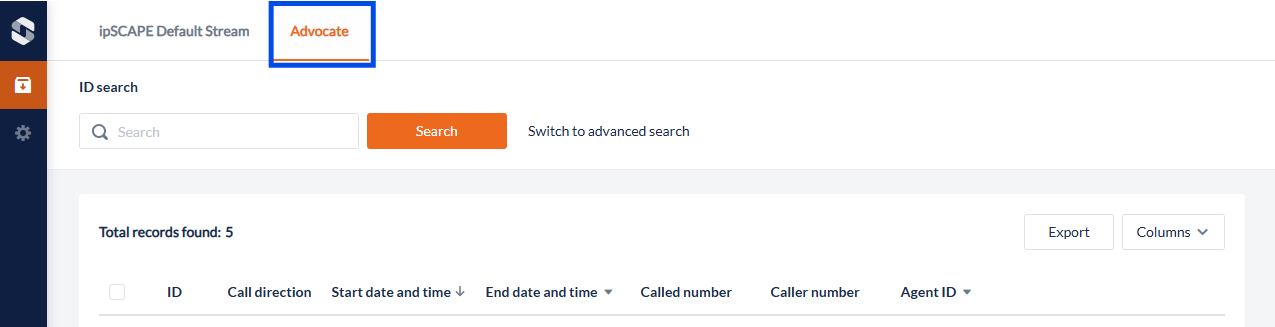
Both the Vault (IPscape Default Stream) tab and the Advocate tabs look the same. The difference is in the “Columns” that can be displayed. Within Advocate, when selecting the Columns dropdown menu, you will see a section called “Other Columns” This will allow you to select and view additional as seen below:
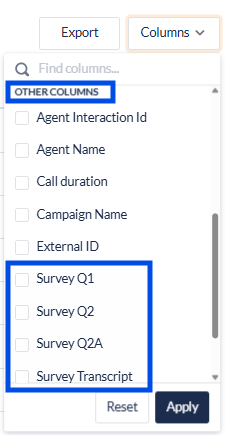
The additional fields will be the Survey Question results and the Survey Transcript. These fields may be named differently depending on your setup. Please note that these fields don’t stay selected when exiting and accessing Vault, you will need to select them again when you access the Advocate Tab.